Turn Your Videos into Blueprints
Build on tutorials you own, prepare your storefront, and submit Blueprints for review.
Workflow Step Verify Your Source
Interactive preview · Nothing is saved or published
Verify Your Source
Start with a tutorial you created or have permission to publish.
Illustrative Tutorial

Confirm Your Source
Use a tutorial you created, or obtain permission from its owner to use and publish the material.
Check What Permission Covers
Review the tutorial and any included images, footage, or other material before adapting it into a Blueprint.
This example does not verify ownership or publishing rights.
Explore Creator ToolsBlueprints · Storefront · Travel Guides · Publishing
TravSync for Creators
Turn Your Travel Video Into a Guide
Connect your YouTube channel, choose chapters from your video's description, and save a private Travel Blueprint. Add locations, visit durations, and your tips before previewing and publishing.
TravSync is where you create and experience the guide. Your Travel Blueprint can be shared free or sold in the Blueprint Marketplace, subject to existing publishing and monetization requirements.
Explore the Blueprint Walkthrough
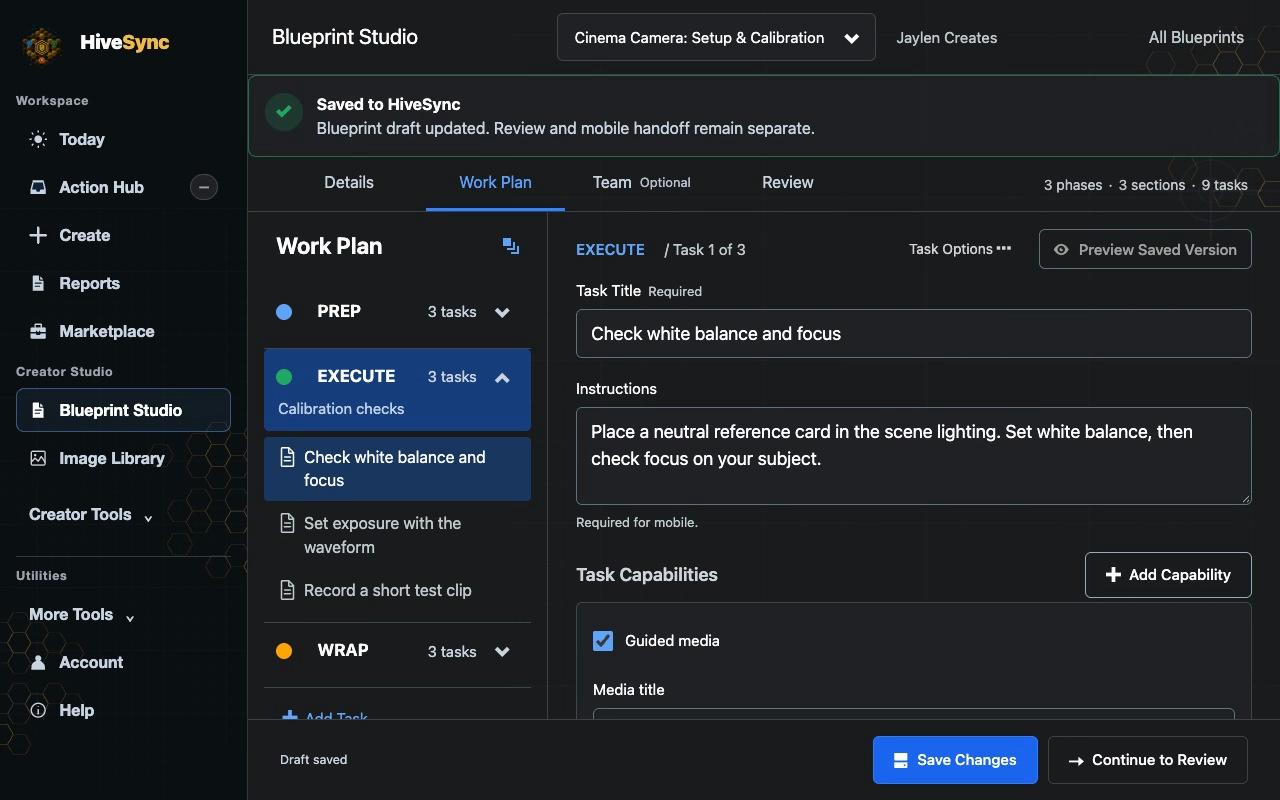
Review a Camera Blueprint
See how a camera setup tutorial becomes a checklist viewers can follow.
- Verify your source. Use a YouTube video you own or have permission to use.
- Add the instructions. Turn chapter timestamps into steps such as checking white balance and focus.
- Review your private draft. Check the steps before saving. Publishing requires a separate review.
Example only. No sign-in is needed to view it.
 Static Authoring Example
From Video to Action
- Use your video
- Add practical steps
- Preview privately
- Submit for review
- Learn in HiveSync
Marketplace availability requires review and approval.
Creator Examples
Turn repeatable work into practical lessons your followers can complete.
- Fitness
- Trades
- Mobility coaching
- Cinematography
- Travel guide creators
Publishing and Review
Private Setup
- Verify the exact video you own or have permission to use.
- Author or review every phase, task, timer, checklist, and completion step.
- Review the safe preview and storefront before requesting Marketplace release.
What Stays Separate
- Publication rights and Marketplace review
- Buyer access, refunds, disputes, and chargebacks
- Confirmed sales, creator balances, and payout readiness
Common Questions
When do I provide my video? After sign-in, during private setup and ownership review.
Can someone else’s content become my product? No. You must own it or have permission to publish it.
When do buyers see full detail? Only after HiveSync confirms the required access.
Estimate Potential Sales
Local estimate · 70% creator-share assumption
Estimate a Sales Scenario
Scenario: 200 purchases · $3,800 gross · $2,660 estimated creator share at 70%
Scenario estimate only—not guaranteed sales or payable income. Actual amounts depend on confirmed purchases, current terms, fees, taxes, refunds, chargebacks, disputes, holds, and payout readiness.More Ways to Get Started
Questions and Capabilities
What kinds of tutorials fit?
Start with one repeatable outcome in fitness, trades, mobility coaching, cinematography, field work, production, or another specialty you can responsibly teach.
Does pasting a URL create or publish anything?
No. This public page checks only the link format. After sign-in, exact ownership verification and Blueprint creation happen privately; publication requires a separate review and release.
Can HiveSync turn someone else's content into my product?
No. You must own the workflow or have permission to publish it, and you must author or review the actual Blueprint before submission.
When can buyers see the full Blueprint?
Public visitors receive only a shortened safe preview. Full paid detail requires HiveSync-confirmed buyer access, and refunds or disputes can affect later access and creator payment.
Does the calculator predict earnings?
No. It is a local scenario estimate. It is not a forecast, guarantee, confirmed sale, commission, payable balance, or payout statement.
What You Can Do Today
Starting creator setup creates no public listing, badge, buyer review, guaranteed placement, sale, commission, payout, or income. Only content you created or have permission to publish can move forward.
- You control whether a private draft is submitted for review.
- Buyers never receive full paid detail from this public page.
- HiveSync does not manufacture creator identity, credentials, work evidence, buyer demand, or earnings.
- Search position remains based on relevance, completion evidence, quality, complaints, refunds, and policy—not creator claims.
Conditions and Limits
Public previews stay shortened. Marketplace release, buyer access, refunds, disputes, chargebacks, holds, and payout status remain separate HiveSync-confirmed records.